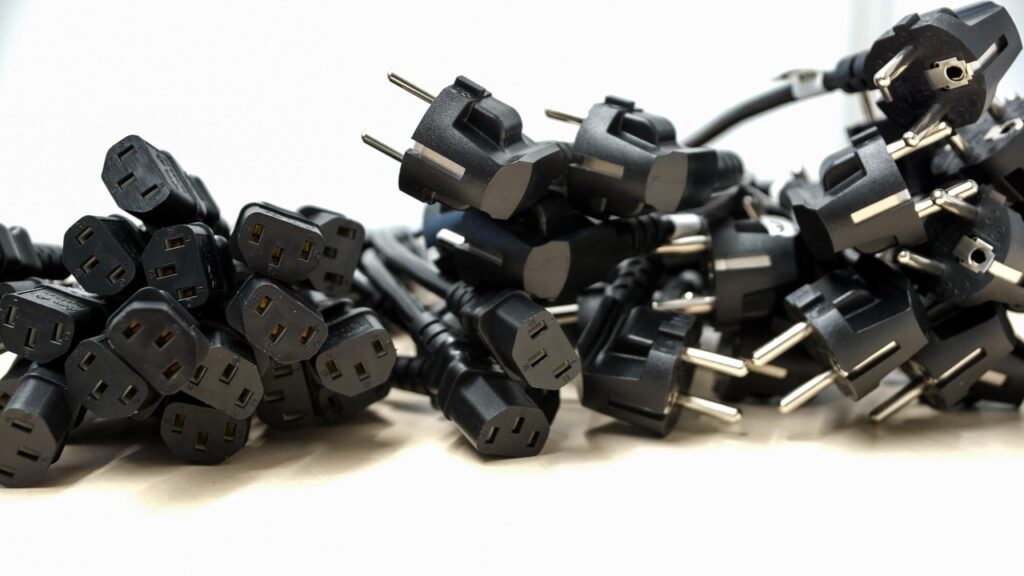
In IT environments, everything is powered by data cables. They support the server racks in a data center, display systems in a control room, and the networking gear in an office. And for all these, you need to ensure that you have the right connector to guarantee clean and consistent power.
IEC connectors were created to help ensure this by guaranteeing compatibility and reliability across a wide range of devices. However, you still need to understand the types and the various considerations when choosing IEC connectors from RS and other suppliers. This is important, as it will help ensure your connections match the required operational requirements, heat thresholds, and scalability plans.
What are IEC Connectors and Why Are They Important?
IEC connectors are standardized electrical connectors set out by the International Electrotechnical Commission (IEC). They are the standards used worldwide as the reference for power delivery in electronic devices and are in every IT environment.
Electrical connectors under the IEC banner are categorized under the IEC 60320 standard. This defines their shape, voltage, and current ratings for different equipment that operates with up to 250 volts. The categorization matches pretty much all IT team needs, so it significantly reduces the risk of mismatches and overloads across regions and vendors.
The Common Types of IEC 60320 Connectors
The IEC 60320 family includes quite a number of connector types, and each of them is designed to handle specific voltage, current, and temperature requirements.
C13 / C14 Connectors
This is the workhorse of the IT department. The C14 is what’s used on most servers, desktop computers, and networking switches, making it the most popular connector. The C13 is its female equivalent, so it’s what is on the equipment inlet. The two are rated for 10 amps at 250 volts and support temperatures of up to 70°C.
For most networking equipment, that’s plenty of power. However, some high-density blade servers may demand up to 15-20 amps, requiring something more robust.
C15 / C16 Connectors
These are similar to C13/C14, but they are used in areas that need higher heat tolerance. They support up to 120°C compared to 70°C, which makes them an alternative in warmer environments or more suitable for equipment that may generate a lot of heat. To differentiate them from C13/C14, they have a notch near the base.
C19 / C20 Connectors
C19/C20 connectors take things even higher, as they can handle up to 16 amps at 250 volts. This takes them beyond regular devices to the level of enterprise servers, blade chassis, UPS systems, and power-intensive storage arrays that require greater current capacity.
The difference in capacity can be seen when you look at the C13/C14 and C19/C20 side-by-side. The latter are bigger and may need better ventilation, as they create more heat when under load.
C5 / C6 Connectors
These are often called “cloverleaf” or “Mickey Mouse” due to their three-prong shape and are rated for 2.5 amps at 250 volts. They basically look like miniature versions of IEC connectors, and you’ll recognize them from laptop power bricks. They are also used on some compact network appliances as they take up less space. However, they aren’t flexible, as they can only be inserted in one direction.
C7 / C8 Connectors
These have a distinctive two-prong shape and are often referred to as “figure-8” or “shotgun” connectors. They are rated for a low 2.5 amps at 250 volts and are what you’ll find on monitors, some laptops, and projectors. They can be inserted in any direction, so they are convenient.
Matching IEC Connectors to Real-World Applications
When you are setting up or upgrading your IT environment, you have to understand the type of connector required by each piece of equipment. IEC grouping makes everything easy, as knowing the classification helps avoid more technical details and power issues.
But besides figuring out whether a server rack requires a C13/C14 or C19/C20 connection, it’s also a good idea to create an internal reference chart. It helps map all the organization’s devices to their connector types and current rating, simplifying deployment and making it easy to ensure compliance even when the staff changes.

- Understanding IEC Connectors for Servers, Monitors, and Networking Gear - October 17, 2025
- Using Modern Technology to Purchase Life Insurance in Australia: Strategies - July 11, 2025
- Do VPNs Cause Lag - June 25, 2025