Scaling penetration testing across cloud environments is difficult when the number of assets grows faster than the team’s ability to test them. Scanners can cover more assets with additional capacity or a license upgrade. Maintaining the same level of exploitation testing across those assets takes more work.
According to the Cloud Security Alliance (CSA), 63% of organizations use more than one cloud provider, averaging 2.7 environments. The research, commissioned by Tenable and conducted by CSA, also found that 82% operate hybrid environments.
A team might scan every cloud asset in scope and still have little evidence of what an attacker could exploit. As organizations add new accounts and workloads, maintaining exploitation coverage becomes harder, particularly when the same testers are responsible for investigating the findings.
TL;DR
- Testing depth: How much of the cloud estate have testers attempted to exploit?
- Authentication: Did the scanner log in, or did it test only the public pages?
- Cadence: Do testers assess new workloads before teams terminate them, and how does the vendor bill for those assets?
- Team workload: How much manual work remains after the scan, particularly for triage and retesting?
What does scaling mean when penetration testing requires exploitation?
Penetration testing involves attempting to exploit vulnerabilities to establish whether an attacker could use them. Scanning identifies potential weaknesses, but a scanner finding alone does not establish exploitability.
A team might scan 500 cloud workloads and identify hundreds of vulnerabilities. If testers attempt exploitation on only a handful of those workloads, most of the environment remains untested beyond vulnerability scanning.
Automated exploitation tools can handle some of that work. They can test known exploitation techniques and, depending on their capabilities, attempt privilege escalation or movement between connected systems. Human testers still need to investigate application logic flaws and attack paths that automated tools cannot adequately assess.
Start by looking at last quarter’s results. How many findings include evidence of attempted or successful exploitation? How many remain unvalidated scanner results?
Why does broader coverage often mean thinner testing per asset?
A team that previously spent several hours testing each cloud asset might now have time for little more than a vulnerability scan. Testers concentrate exploitation attempts on fewer targets, leaving much of the environment without validation.
Three measures help assess the effect:
- Validated findings per asset: The number of vulnerabilities for which testers have recorded exploitation evidence
- Share of assets receiving exploitation attempts: The percentage of in-scope assets against which testers attempted exploitation.
- Time from detection to evidence: How long the team takes to establish whether a reported weakness is exploitable.
These numbers need interpretation. An environment with effective security controls may produce few successful exploitation attempts. The proportion of assets tested for exploitation helps distinguish that outcome from a program that relies almost entirely on scanning.
A CVE and severity rating alone cannot establish whether an attacker can exploit a vulnerability. For penetration testing, the tool should record what happened during the exploitation attempt, including whether the tester gained access or escalated privileges.
How does credential and configuration drift break authenticated scanning?
Authenticated scanning tests application functionality behind a login, whether the application is publicly accessible or restricted to an internal network.
A scanner might authenticate successfully in staging but fail against production because the SSO configuration is different. Rotated passwords, expired session cookies, and MFA requirements can make it unable to access pages behind the login.
A scanner can finish a scan without ever reaching an authenticated page. Unless it reports the login failure, the team may assume it tested the application behind the login.
Look for tools that verify login on each target and flag authentication failures. They should handle multistep login flows and report which authenticated areas they managed to test.
Some tools support MFA-protected applications through a supplied session cookie or authentication header. The scanner still needs to detect when that session expires, otherwise subsequent tests may run without authentication.
Can the tool reach private cloud subnets?
For workloads restricted to private AWS VPC or Azure VNet subnets, the scanner needs network access through an internal scan engine or VPN.
Some tools need a separate component inside each network, leaving the security team in charge of deployment and maintenance.
Does testing cadence keep pace with cloud change?
If a team deploys a workload on Monday and terminates it on Wednesday, a scanner running on Friday will miss it. Teams can shorten the interval between scans or configure their deployment pipelines to trigger additional tests.
Weekly or daily scans reduce the interval between deployment and detection, although the appropriate schedule depends on the environment and the resources available for testing.
Change-aware alerting can draw attention to newly exposed services or findings that appear after a deployment.
In a July 2026 survey of 201 security practitioners, Pentest-Tools.com found that 60.2% assess security control effectiveness at least monthly. Just 9.5% rely on annual assessments.
Licensing can become expensive if a vendor counts every new cloud instance against an asset allowance, including workloads that run for only a few hours. The contract needs to specify how the vendor counts temporary instances and whether terminated assets remain billable.
What keeps team load manageable as scope grows?
With weekly scans, analysts need a way to separate new findings from those already under investigation. Otherwise, they end up reviewing the same vulnerabilities every time a scan runs.
Scan diffs help identify what has changed, while API integrations can send findings to the team’s ticketing system and initiate retesting once remediation is complete.
Testers also need enough evidence to investigate a finding without having to reproduce the scanner’s work from scratch. If automated exploitation fails, testers should be able to inspect the original HTTP request and response, including the affected endpoint, before deciding how to proceed manually.
For infrastructure testing, evidence of accessible services or attempted privilege escalation can help testers decide what to investigate next.
Internal teams and MSSPs should also examine how tools handle multiple projects and testing environments. Analysts working across several customers or business units need to separate findings and track remediation without manually rebuilding the same workflows for every engagement.
How do ISO 27001 and NIS2 affect cloud penetration testing?
ISO/IEC 27001:2022 Annex A control 5.23 addresses how organizations manage security when using cloud services. Penetration testing can help assess whether the controls protecting those services work as intended.
Organizations can use penetration test results to document which cloud systems testers assessed, what vulnerabilities testers managed to exploit, and whether subsequent testing confirmed that the fixes worked.
NIS2 introduces more specific security testing requirements for certain service providers.
Commission Implementing Regulation (EU) 2024/2690, Annex point 6.5, requires covered entities, including cloud computing service providers, managed service providers (MSPs), and MSSPs, to establish and apply security testing policies.
Organizations determine the scope, frequency, and type of testing through their risk assessments. They must document their tests and results, along with the actions they took to address identified weaknesses.
Scheduled test results, exploitation evidence, and retest histories give auditors records they can examine. Teams can also feed those records into governance, risk, and compliance (GRC) platforms, reducing the need to assemble evidence manually before each assessment.
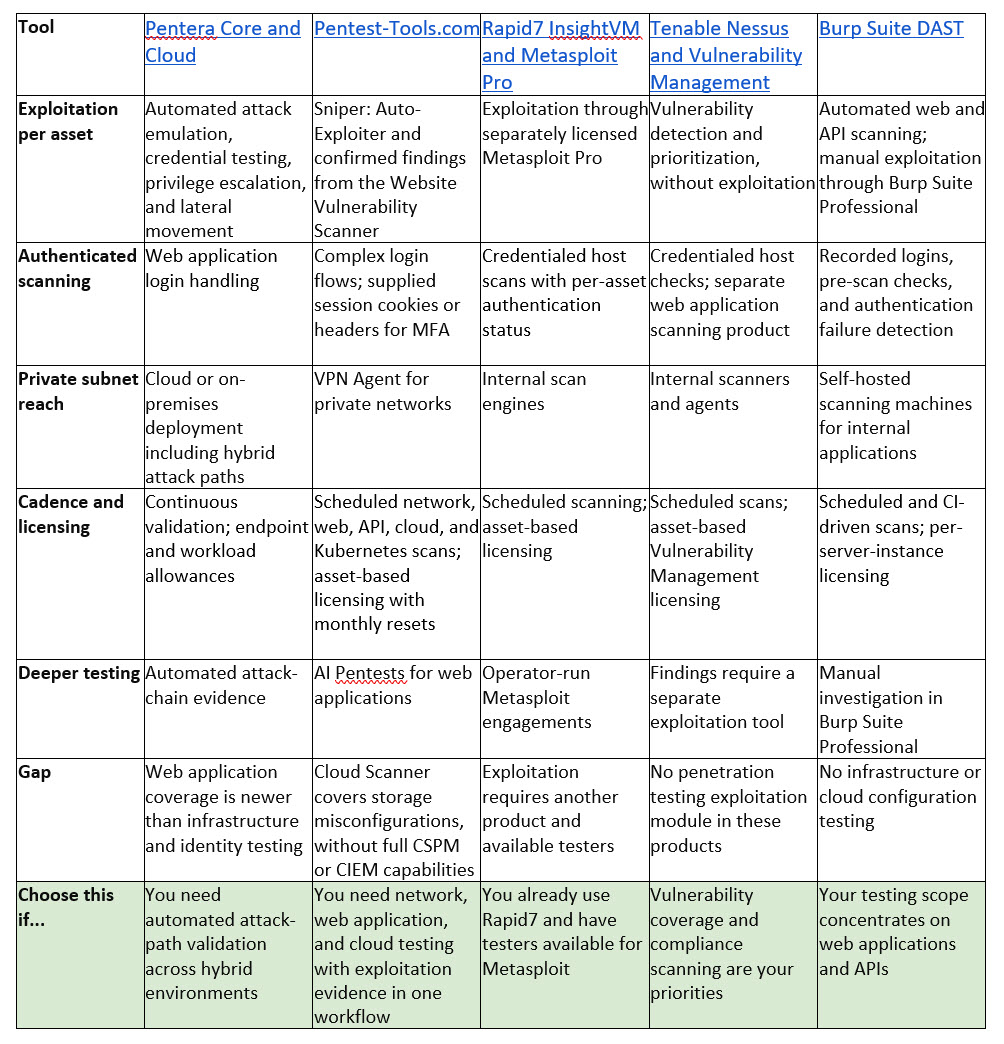
Which tools fit different cloud penetration testing requirements?
The tools below approach cloud testing differently. Some support automated exploitation, others concentrate on vulnerability discovery, and some focus on web applications and APIs.
Cloud penetration testing tool comparison
What should you ask before choosing a tool?
Use the results of your last testing cycle to establish where the existing process falls short. Then ask vendors to demonstrate how their tools handle those weaknesses.
- What share of in-scope cloud assets received an exploitation attempt during the last cycle?
- Does the tool report when an authenticated scan fails to log in?
- How does it reach private subnets, and who maintains the connection?
- Does licensing accommodate workloads that appear and disappear throughout the month?
- When a finding needs more than automated scanning, what evidence can a tester use to continue the investigation?
During a proof of concept, include an application with a multistep login, a private cloud workload, and a finding that requires manual exploitation. Ask the vendor to show what the tool produces for each.

- Scaling Penetration Testing Across Cloud Environments: What to Look For - November 23, 2026
- Open Source AI Agents for Cybersecurity: Inspect, Then Trust - November 16, 2026
- How AI-Powered SOCs Are Disrupting the Rise of Business Email Compromise Attacks - September 8, 2025