I manage my day with lists. Notion, OneNote, Apple Notes—I’ve tried them all. But no matter how slick the interface or how many integrations an app offers, I always come back to pen and paper. There’s something tactile and grounded about flipping open a notebook, jotting down your tasks for the day, and physically crossing them off as you go.
For me, it’s almost more about the ritual than the organization. Every night, I wind down by looking ahead to tomorrow. I review my calendar, identify high-priority tasks, and write them down. That small moment of planning helps set my mindset. And during the day, that list is my compass. When a notebook fills up, I toss it. It may contain ideas, call notes, or useful sketches, but those pages aren’t indexed or searchable. They’re history.
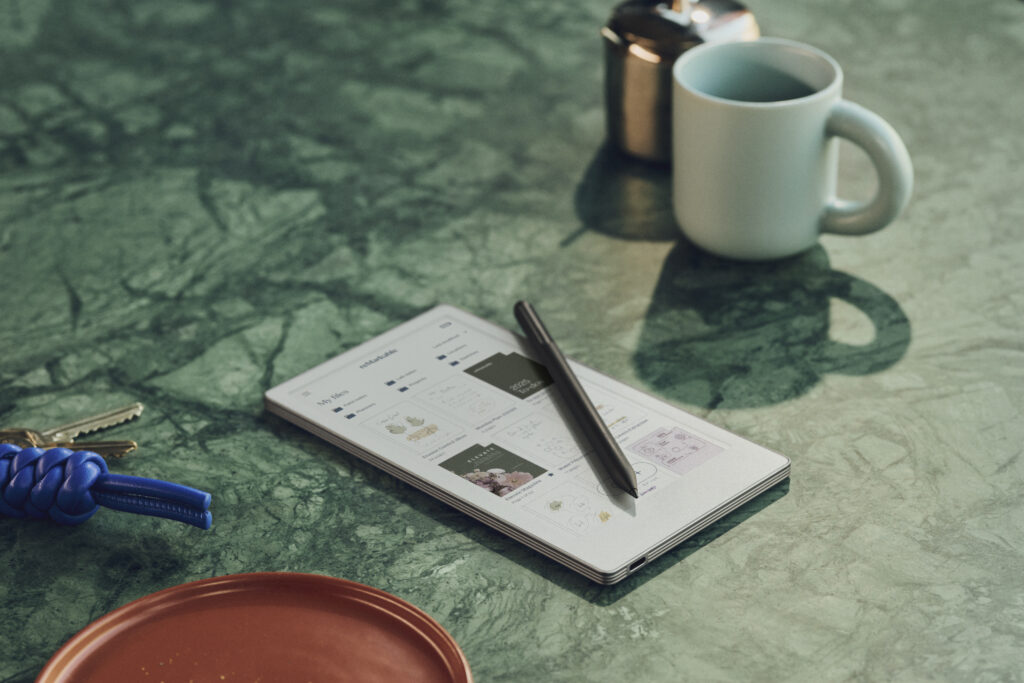
Enter the reMarkable Paper Pro Move—a color E Ink tablet that delivers the feel of writing on paper with the power and permanence of digital. After weeks of use, it’s clear: this is more than a notebook replacement. It’s the notebook I always wished existed.
Form
The Paper Pro Move is striking in its simplicity. With a 7.3-inch color E Ink display housed in a frame that’s just over 6mm thick and weighing about half a pound, it feels more like a premium notepad than a tablet. It’s compact enough to carry in a jacket pocket, and it disappears into a backpack. There’s a USB-C port for charging and data, and it supports both 2.4 and 5GHz Wi-Fi for syncing and cloud connectivity.
The display uses reMarkable’s “Canvas Color” technology—a Gallery 3 E Ink panel that balances color expression with battery efficiency. It’s not vibrant like an OLED screen, but that’s the point. It’s easier on the eyes, free of glare, and ideal for long writing or reading sessions. And thanks to a textured surface and the Marker Plus stylus, it delivers a writing feel that’s incredibly close to actual pen and paper.
Function
This is where the Paper Pro Move really shines. It’s not a general-purpose tablet, and it doesn’t pretend to be. There’s no app store, no notifications, no distractions. What you get instead is a tightly focused tool for thinking, reading, writing, and organizing your ideas.
The writing tools are broad and well-executed: five pen types (ballpoint, marker, fineliner, pencil, paintbrush), a highlighter, and nine pen colors. That flexibility allows you to brainstorm in one style, annotate in another, and sketch or color-code as needed. Palm rejection works flawlessly, and writing with the stylus feels fluid and immediate.
Templates are another standout. reMarkable has packed in a wide selection: lined, dot grid, graph paper, Cornell notes, day and week planners, checklists, storyboard layouts, perspective grids, even music templates like guitar chord diagrams. And if what you need isn’t built in, you can download additional templates from the community and load them onto the device. I’ve done exactly that, and it’s one of those subtle things that transforms how useful the device becomes.
You can import PDFs and EPUBs, mark them up with the stylus, and export them as PDF, PNG, or SVG. I’ve used this to review white papers, jot margin notes on proposals, and highlight content during interviews. The Move doesn’t just support passive reading—it invites interaction.
One of my favorite features is handwriting-to-text conversion. With the reMarkable Connect subscription, you can select handwritten notes and convert them into editable text with surprising accuracy. You can export those notes via email or cloud, or paste them directly into a document or Slack thread. It’s a huge upgrade over trying to type up meeting notes later.
Then there’s search—the feature that finally breaks me free from tossing old notebooks. Everything I write is searchable. If I wrote a note last month about a client’s request or a product idea, I can find it with a keyword. That alone justifies the move from paper to digital for me.
Files are synced across reMarkable’s desktop and mobile apps, and there’s built-in support for Google Drive, Dropbox, and OneDrive. That means your notes and documents are available wherever you need them—and easy to back up. And behind it all is enterprise-grade security: files are encrypted in transit and at rest, and reMarkable’s services comply with GDPR standards.

Experience
Using the Paper Pro Move has quickly become part of my routine. I still sit down at night and plan my next day’s tasks—but now, I do it on the Move. I start with a checklist template, write out my priorities, and throughout the day, I scratch off completed items with the same satisfaction I used to get from ink on paper.
But I’ll admit: it wasn’t seamless from the start. When I first began writing long lists, I would hit the bottom of the page and instinctively try to pinch-to-zoom and shrink the page down. It was awkward, and I couldn’t get things aligned the way I wanted. Eventually, I reached out to reMarkable’s support team. They quickly and kindly pointed out a feature I had missed: a simple two-finger swipe gesture that scrolls the page downward indefinitely. That one tip changed everything. Now my to-do lists never run out of room.
Over time, I’ve come to appreciate just how quietly powerful this device is. When I used paper notebooks, I’d eventually fill them up, tear out a few useful pages, and toss the rest. With the Move, my notes stay searchable, synced, and secure. They’re not just preserved—they’re usable.
Battery life has been excellent. I use the device daily and only charge it about once every week or two. And despite the compact screen, it never feels cramped. The clarity, combined with the thoughtful page layouts, makes even dense reading or writing tasks feel manageable.
The Verdict
At $449 (plus extras for the Marker Plus or Type Folio), the reMarkable Paper Pro Move is a premium tool. But for those of us who live by our notes, sketches, checklists, and annotated PDFs, it’s a game-changer. It doesn’t try to be everything—it’s not an iPad. But in being less, it becomes so much more.
It’s paper with a searchable memory. A notebook that syncs. A writing tool that respects your thoughts and preserves them.
And for me, it’s become essential. Now, I can go cross off “write reMarkable Paper Pro Move review” from my to-do list on the reMarkable Paper Pro Move.

- How Africa: Earth’s Wild Home Captured Behavior Never Filmed Before - October 1, 2026
- The Real Cost of AI Hasn’t Shown Up Yet - September 30, 2026
- What It Took to Drill Down to 33 Trapped Miners - September 25, 2026